"Why Can't I Find My Business?" Explaining Personalized Search to Clients
If you work in an SEO agency, you have undoubtedly received this panicked email from a client:
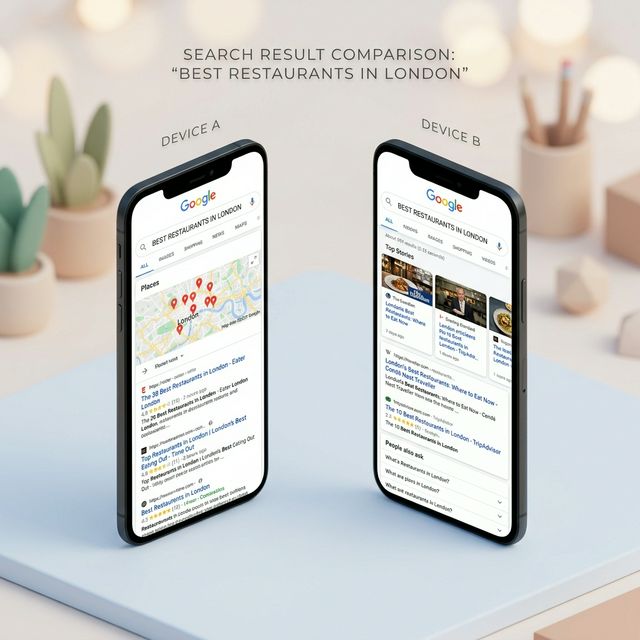
"I just Googled my main keyword from my house, and I can't find my business anywhere on page one! Why am I paying you if we aren't ranking?"
Meanwhile, your professional SEO tracking software clearly shows they are ranking #2 in their target city.
Managing client expectations around local rankings is incredibly challenging because most people do not understand how heavily Google personalizes search results. Here is exactly how to explain geolocation bias to your clients and prove that your SEO strategy is working.
The Problem: Why Google Personalizes Search Engine Results
Google's ultimate goal is to provide the most relevant answer to the user as quickly as possible. To do this, Google acts like a hyper-aware digital assistant, tailoring the results based on everything it knows about the person searching.
When your client searches for their own service (e.g., "divorce lawyer"), Google doesn't just look at the keyword. It looks at:
- Physical Location: Their IP address, GPS data, and WiFi connection.
- Search History: Have they searched for this before and ignored their own website out of habit?
- Device: Are they searching on a mobile phone or a desktop?
If your client's office is downtown, but they are searching from their house in the deep suburbs 15 miles away, Google will show them lawyers physically closer to their house, not their own downtown office.
How to Explain Geolocation Bias to Your Local Clients
When explaining this to clients, avoid overly technical jargon. Use physical analogies they can understand.
The Coffee Shop Analogy: Tell them: "Imagine asking your phone for a 'coffee shop near me' while standing in your kitchen. Google will show you the Starbucks down your street. Now, imagine asking the same question while standing at the airport across town. You get a completely different list of coffee shops. The same thing happens with your business."
Explain that their ranking is a moving target that changes drastically mile by mile based on proximity.
How to Prove Real, Unbiased Rankings
The best way to defuse a frustrated client is to stop arguing and start showing them the objective truth.
Instead of trying to teach them how to clear their cache, clear their cookies, and turn on a VPN, just use a free search simulator on a screen-share.
- Ask the client: "What exact city or neighborhood are your ideal customers located in?"
- Open a localized search simulator like QueryFrom while on a screen-share with the client.
- Type in their service keyword and set the location to their target city.
- Run the simulated search.
Because the simulator bypasses personal browsing history and simulates the search from the target location's geographic coordinates, the client will immediately see their business ranking exactly where your reports said it was.
By educating your clients on personalization and using transparent simulation tools, you can eliminate panic and build long-lasting trust in your agency's local SEO results.
Further Reading
- Understand implicit vs explicit queries in depth: Implicit vs Explicit Search Queries: Why Intent Changes Everything
- Learn the three pillars of local ranking: How Google's Local Search Algorithm Works in 2026
- Read the data behind GBP performance: How to Read a Google Business Profile Insights Report
Digital marketer specializing in Local SEO and PPC. James has spent years helping businesses and agencies understand what their customers actually see on Google — and built QueryFrom to make that process faster for everyone.